This is default featured slide 1 title

Go to Blogger edit html and find these sentences.Now replace these sentences with your own descriptions..

This is default featured slide 2 title

Go to Blogger edit html and find these sentences.Now replace these sentences with your own descriptions..

This is default featured slide 3 title

Go to Blogger edit html and find these sentences.Now replace these sentences with your own descriptions..

This is default featured slide 4 title

Go to Blogger edit html and find these sentences.Now replace these sentences with your own descriptions..

This is default featured slide 5 title

Go to Blogger edit html and find these sentences.Now replace these sentences with your own descriptions..

Showing posts with label Technology. Show all posts

How to Increase Internal Phone Memory of Samsung Galaxy Y - S5360

Error message when internal memory is full.

Disclaimer:
Techscot.Blogspot will not be held responsible for any loss of data caused by following these instructions, please do every step carefully and at your own risk!

As you all know the Samsung Galaxy Young has very low internal memory unlike the bigger smartphones out there with gigabytes of space while our little Y has only 160MB.
Sometimes it can be a huge pain when some apps install on your memory and you keep getting messages like "insufficent memory available" or "uninstall some applications", sometimes you even get notifications on the screen such as "internal memory nearly full", etc.

All you need for this procedure is an SD card with some memory you are willing to sacrifice of, ClockworkMod recovery to help us partition the SD card, Link2SD to move the apps automatically to the 2nd partition (this option is enabled by default) and ofcourse, a rooted phone.

Before everything, please make a complete backup of your files from your SD card to some folder in your computer.

Download CWM - Click here
Download Link2SD from the Play Store:
Once you downloaded CWM on your sd card and installed Link2SD, proceed with the video instructions:


And that is how you partition your SD card to get more memory for your apps.

How to download APK files from Google Play to Pc

If you ever wanted to download Android application directly from Android Market Place to PC, than we have something really interesting for you called “APK Downloader”, well it’s a chrome extension which can download any application your are browsing on Android Market right to your PC without any problems but we need to configure it before we could actually use it.

Guide

Requirements:Google Chrome 20
Android Device ID [Google Play] [Mediafire] Recommend to download from Google Play to avoid any issue.
APK Downloader Chrome Extension

STEPS:
  1. Make sure you have a Google Chrome VERSION 20 installed on your PC.
  2. Download and install the Device ID on your Android device.
  3. Download and install the APK Downloader Chrome Extension. (Please view the video to learn how to install)

    Chrome Extension Page
  4. Disable SSL error warnings
    • Close Google Chrome application [!Important!]
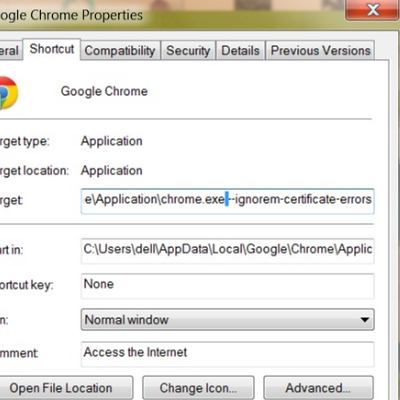
    • Right click on the Chrome shortcut and select "Properties"
    • Select the "Shortcut" tab, and add [space]--ignore-certificate-errors at the end. It should look like this:

    C:\…\chrome.exe --ignore-certificate-errors
    C:\…\chrome.exe --ignore-certificate-errors
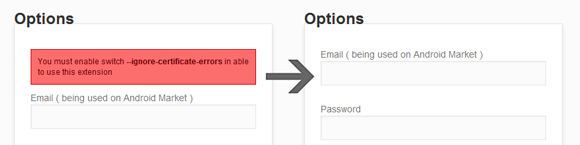
  5. Close Chrome and re-open it with the modified shortcut, then open the APK Downloader options page. If there is no warning box, then you successfully disabled SSL error warnings.

    APK Downloader options page
  6. Enter email and device ID on Options page
    1. There are two ways to get Email and Device ID
    a. Easy way: install this Device ID app, it will show you your GSF ID and Device ID, what we need here is GSF Android-ID (used by Google Services)
    b. Difficult way: Open dial pad, call *#*#8255#*#* ( 8255 = TALK ). If it opens “GTalk Service Monitor”, find lines that begin with JID and Device ID. Your email is JID, and your device id is a string that after android- prefix
    For example: if it shows android-1234567890abcdef , then your device ID is1234567890abcdef
    Do not type in random email or device ID, it won’t work
  7. That's it. You can now start using APK Downloader.

    **After logging in, you can navigate to any Google Play App page, and click the APK Downloader icon in the Address bar to download the .apk to your desktop!

    After finished the steps above, you can start using APK Downloader. Open Google Play, view any FREE apps ( for example: YouTube ), then press the APK Downloader icon on address bar ( see screenshot )APK Downloader


    http://www.androidpolice.com/2012/02/25/download-apks-directly-from-the-web-market-to-your-computer-with-the-apk-downloader-extension-for-google-chrome/

    http://rumah-android.com/download-apk-file-from-web-android-market-to-your-computer.html

    http://www.bbin.in/en/2012/02/howto-download-apks-from-android-market-port-to-playbook/

    http://www.symbianize.com/showthread.php?t=672277 

Samsung Unveils World's First Windows 8 Phone

The announcement at a Berlin electronics show comes amid expectations that smartphone makers may turn increasingly to Windows devices after a US jury decided many of Samsung's Google Android-based phones infringed Apple Inc patents.

Samsung first Windows 8 phone

Samsung Electronics became the first handset maker to announce a smartphone using Microsoft's latest mobile software, making its surprise, hurried announcement just days before the highly anticipated launch of Nokia's version. Samsung said the ATIV phone would hit stores in the October-November period but did not give an exact start date.
Samsung first Windows 8 phone
The brief announcement at a Berlin electronics show comes amid expectations that smartphone makers may turn increasingly to Windows devices after a US jury decided many of Samsung's Google Android-based phones infringed Apple Inc patents.
Samsung first Windows 8 phone
 Samsung's ATIV S Windows phone sports a high-end 4.8-inch display, Corning "Gorilla" glass, and an 8-megapixel rear camera and 1.9-megapixel front-facing camera.
Samsung first Windows 8 phone
 The ATIV S features a dual-core 1.5GHz processor, a 4.8-inch high-definition Super AMOLED display, 1GB of RAM, microSDHC support, an 8-megapixel camera, and a 2,300 mAh battery.
Samsung first Windows 8 phone
 Samsung's Windows-based smartphone, introduced on Wednesday, marks the first in a 'big lineup of new hardware' from the South Korean company based on Microsoft's software, Microsoft executive Ben Rudolph said.
Samsung first Windows 8 phone
 Samsung hopes the new device will take the focus away from its loss of the court case. Apple is now seeking speedy bans on the sale of eight Samsung phones, moving swiftly to turn legal victory into tangible business gain.
Samsung first Windows 8 phone
Nokia, the ailing Finnish mobile firm, once the world's leading producer of phones but now struggling to reverse losses, is due to unveil its new Lumia line of smartphones using Windows Phone 8 in New York on September 5.
Samsung first Windows 8 phone
 Analysts say the introduction of Samsung's Windows phone may be designed to assuage concerns that Microsoft will favor Nokia, whose Chief Executive Stephen Elop -- himself a former senior Microsoft executive -- has staked its future on the Windows platform.

In 2020 We Can Wear Sony Computers On Our Wrist

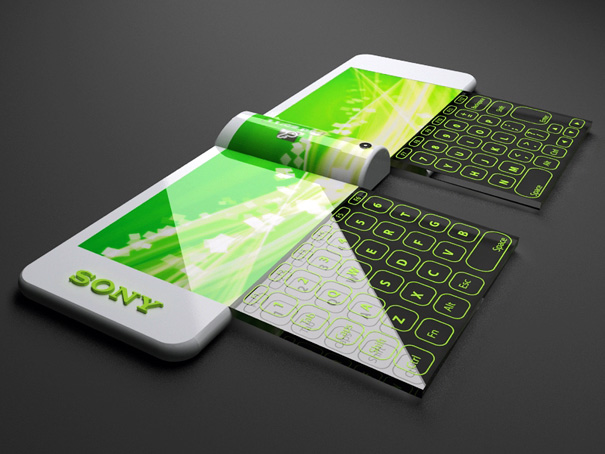
Our present need for internet connectivity is so profound that secondary devices like the Nextep Computer are bound to happen. Developed to be worn as a bracelet, this computer concept is constructed out of a flexible OLED touchscreen. Earmarked for the year 2020, features like a holographic projector (for screen), pull-out extra keyboard panels and social networking compatibility, make the concept plausible. Ten years from now is not too far away, so how many of you think we’d be buying such gadgets?

Designer: Hiromi Kiriki
Latest Sony Computers 1
Latest Sony Computers 2
Latest Sony Computers 3
Latest Sony Computers 4
Latest Sony Computers 5
Latest Sony Computers 6
Latest Sony Computers 7
Latest Sony Computers 9
Latest Sony Computers 10

Emperor 200 luxury computer workstation

This over-the-top looking setup gives you a comfy ergonomic leather seating unit with touch-screen controls, and a view to kill with three computer displays positioned just right for you to lean back and enjoy.


The whole thing is motorized too, so you can adjust the angle of your environment without getting up out of your chair. It’s also got a work surface for a keyboard and mouse, and the monitors can be positioned at a flat eye-level if you want to get some work done.


Smart phone book

Ilshat Garipov by Russian designer to visualize the future, smart phones (smart phones booklet) Folding type mobile phone book brought inspiration from the book.the same function alone as an independent player in a separate page, the page can be. Music, video, photos, etc. All information is stored in the cloud server, so help is only a carrier, if you wear the phone book, easy transfer of information and set up a new blank phone book amount of wear from recycled and biodegradable be.
Is so powerful, so attractive the face of mobile phones, said that even if we imagine it, where to buy many of my friends I'm afraid to ask? Designers responded: So, you can buy anything. But the concept does not mean impossible, it is envisaged in the phone book "smart" nanoparticles will use the production, and energy is vibration your pocket or sun, and the temperature of this particular material Learning in the field of intensive research by scientists in the near future could make this concept.

Download & Install Angry Birds Space Game on Android, iPhone

Angry Birds is probably biggest game nowadays, with support for all platforms, ranging from Android powered Smartphones and Tablets, iOS based iPhone and iPad, as well as standard Windows PC or a Mac. No matter, which device user use to play the game, huge audience loves playing with Angry Birds Space Game. As name is saying, Birds will be on Space this time, not only on earth like earlier, so it would be a different experience for the players.
Download angry birds space Androd Install Guide 600px Download & Install Angry Birds Space Game on Android, iPhone
If you are aware about how much awesome Angry Birds Game is, then we feel this edition would be best ever, as far as we tested the game today. The New Angry Birds Spaces has a great story, to get them locked in a battle. Nothing different, Angry birds saves their eggs, from being stealing by green pigs. When Green Pigs tries to attack the eggs of the birds, they strike on to attack them. This is the subject which is game based on, but with lot of levels, it is looking unspoken experience to me. Recommending you to try the game yourself.
Here are the highlights of Angry Birds Spaces Game
  • 60 Levels: There are 60 gravity-defying levels in total in new Angry Birds, in which 30 are from Pig Bang, and 30 from Cold Cuts. Yes, both provides different experience, but i have not reached to Colt Cuts level yet, i will try later for sure.
  • Golden Eggsterioids Episode: The Space Edition game comes with this locked episode, which is equiavalent to the Golden Eggs, which would provide bonus levels in the game.
  • 30 Brain-teaser (Danger Zone): As name suggests, this is hard to play. This level is only available for Worth $0.99 episode of iOS. I guess it is available for Android edition as well.
  • Enhanced Game Center for iOS, New designed animated birds help menus, Space Eagle.

Download Angry Birds Space Game Editions for Android, iPhone, iPad, PC and Mac

  1. iOS: Appple iOS based devices, iPad, iPhone and others got chance to enjoy two flavors of Angry Birds Spaces. There is a HD Version (Worth $2.99) and a SD version which costs $0.99. You have to purchase before download, Buy iPad HD Version | Buy SD Version for iPhone/iPod Touch for 99¢
  2. Android: Android Phones and Tablets got the editions of ad-supported and ads-free. At Amazon Marketplace, there is a $2.99 HD version is also available, exclusively for Kindle Fire, and can be downloaded from Amazon Marketplace. Other users can download from Google Play/ Android Market, which is a ad-supported version and compatible from Android OS 1.6. Download: Google Play (Ads Free Version) | Amazon Appstore ($0.99) | Samsung Apps (Free)
  3. PC: The Microsoft Windows version will cost you $5.95, which supports levels of up to 1-16. You can checkout demo. Purchase/ Download: Angry Birds Space for Windows.
  4. Mac: Apple’s Mac users needs to spend $4.99 to play the game, the game requires OS X 10.6.6 or above. Download: Mac App Store
 Assuming, you have downloaded required version for your platform. Now, lets learn the ways to Install the Games.
How to Install Angry Birds Space Game/ Apps on Android Devices Manually
Step 1: Visit Google Play/ Android Market, and search for an Apps Installer. You can go with z-App Installer, Fast installer or any other, and install into the device.
Step 2: Now, copy the .apk file, which you have downloaded from Option 2 in Download part above, to the root of your device’s SD card.
Step 3: Now navigate to the App Installer, and find all the .APK files stored into the memory cards, then select the Angry Birds file you have downloaded in Step 2.
Step 4: Now click on the download file (.APK), and the game is ready to play. It will hardly take few seconds, depends on your device.
Congratulations! You have installed the Angry Birds Space Game on your Android Smartphone manually. Enjoy!!
Installing Angry Birds Space in iPhone, iPad, Windows PC, and Mac
If you are Apple iPhone, iPad user, you can download game from iTunes Store or App Store. While, for Microsoft Windows 7, Windows Vista and others can follow the same procedure for software installation, which applies for Mac too.

How to Root And UnRoot Samsung Galaxy Y S5360 – Easy Tutorial

Samsung Galaxy Y is undoubtedly, best Entry Level Android Smartphone. It is equipped with 832MHz processor, and runs originally on Android 2.3 Gingerbread Operating System. It has a 3.0-inch QVGA TFT display, and a 2MP camera. The phone has support for up to 32GB memory card, and leashed with all the connectivity options like Wi-Fi, GPS, or A-GPS.
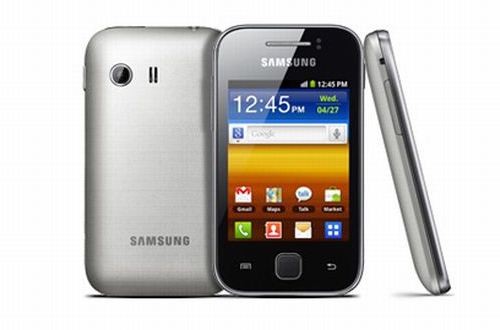
samsung galaxy y s5360 root unroot How to Root & UnRoot Samsung Galaxy Y S5360 – Easy Tutorial
Samsung Galaxy Y has huge base of users worldwide, due to it is most cheapest option when one consider to buy Android Phone. The much advanced users, always want to get Root access, to enable installation of all the software or customization. For all the freedom, and to unlock the full power, you need to get Super User access, which is possible when you root the device. But once you root the device, you will no longer able to claim warranty. But you won’t need to worry, we are here summing up both the tutorial of rooting and unrooting of Samsung Galaxy Y.
Disclaimer/ Warning: Kindly note, Rooting is a risky process. We ‘Techscot.blogspot.in and developer will not be responsible, if your device bricked, damaged, or becomes non-functional. Though, we are writing this tutorial, after testing everything on a Samsung Galaxy Y Device, and it worked for us.
Pre Requisite
  • Ensure that your device is charged, at least 80%, before going through the process.
  • Check with the Data Cable and latest drivers for connectivity of Phone and PC
  • Backup your SMS, Email, Call Logs, Settings and all the data, for safeguard against bad situation. If anything happens, wrong after applying the rooting process, you can simply restore everything from backup.

How to root Samsung Galaxy Y S5360 Android phone

Step 1: You need to download the Rooting package file from here and then save it in your PC.
Step 2: Enable Debugging USB Mode. To get this done, simply navigate to Settings option, and then select Applications, where you will see Development option, tap with the same and then check USB debugging.
Step 3: Connect your Samsung Galaxy Y to computer, and copy the File which you have downloaded in Step into root of microSD card of the device.
Step 4: Now, select ‘Install ZIP from SD card, and navigate to the Rooting package zip file, which has been downloaded in Step 1.
Step 5: Now, turn off the device. And then boot to the recovery mode. To enter into the recovery mode, just use home, Power and volume up buttons together.
Step 6: Now navigate in recovery mode, using volume up and down buttons, find the ‘Apply Update from SD card’ then Browse ‘Update.zip’.
Step 7: Now Go Back to home by pressing ‘++++Go Back++++’
Step 8: Reboot your phone. After rebooting the device, you will see an application ‘Super User’, which would ensure that your device is successfully rooted.
As you have just rooted your device, apart from the benefits, there is a minus point. I have already mentioned, you are not eligible to get company’s warranty after rooting. If you need to claim warranty, we have solution to unroot the device, which will make it same like it was before your applied rooting process. Head over below, where we have summed up the instructions to unroot the device.

Steps to UnRoot Samsung Galaxy Y S5360

Step 1: Ensure that there is no update exist of Super User App, you need to remove the same if they are located.
Step 2: Connect the device to PC, if it is not already connected, via Data Cable.
Step 3: Download Unroot package for Samsung Galaxy Y in your personal computer, and copy the zip file to the root or micro SD card.
Step 4: Switch off the phone, and then turn on into recovery mode.
Step 5: Select ‘Install ZIP from SD card, and select the unroot package zip file, which has been downloaded in Step 1.
Step 6: It will take hardly 5-6 minutes maximum to complete the procedure. After that you need to reboot your phone.
Congratulations! You have completed unrooting procedure of Samsung Galaxy Y, and you can now reclaim warranty.
Let’s know if any problem persists, while going through the process of Rooting and Unrooting of Samsung Galaxy Y S5360 Android Smartphone.

HYT H1: liquid watch concept


watch-concept
Two bellows are used to push and pull the liquid to show the time on the scale. The Hydro by HYT uses a liquid filled chamber to display the hours using luminescent green goo in a circular tube. On the right is a power reserve indicator for the mechanical movement. The minutes are displayed in the center of the face with a dedicated dial, and there is a water turbine style subsidiary seconds hand to the left of it. The movement has a power reserve of 65 hours and is visible through the rear of the watch.
watch concept 2 HYT H1: liquid watch concept
The H1 will be available in titanium, DLC black coated titanium, and 18k red gold. Design wise the case reminds me a lot of the Clerc Hydroscaph. The case will be 48.8mm wide and a pretty massive 17.9mm thick. The HYT H1 in titanium will be priced at $45,000.