This is default featured slide 1 title

Go to Blogger edit html and find these sentences.Now replace these sentences with your own descriptions..

This is default featured slide 2 title

Go to Blogger edit html and find these sentences.Now replace these sentences with your own descriptions..

This is default featured slide 3 title

Go to Blogger edit html and find these sentences.Now replace these sentences with your own descriptions..

This is default featured slide 4 title

Go to Blogger edit html and find these sentences.Now replace these sentences with your own descriptions..

This is default featured slide 5 title

Go to Blogger edit html and find these sentences.Now replace these sentences with your own descriptions..

Showing posts with label Mobile Review. Show all posts

Micromax launches A25 Smarty with 1GHz processor

micromax a25 Micromax launches A25 Smarty with 1GHz processor for INR 3,999 
Another Micromax Android smartphone is arriving in the India as early as tomorrow. Dubbed as Micromax A25 Smarty, it will be priced at INR 3,999 and start retailing from Saholic.com as well as other e-commerce sites.

Micromax A25 Smarty features Android 2.3, 1GHz processor, 2.8-inch capacitive display, dual-SIM connectivity, 1.3MP fixed focus camera, 1280 mAh battery and microSD card support.
While there are certainly many positives for the phone, be it the 1GHz processor or the price or capacitive display in this budget, the smartphone is not without downsides. There is no 3G connectivity and both SIM cards with only have Edge support, and the camera is also of very little use.
With this launch, Micromax now has smartphones in every possible budget (apart from premium & high-end segment) and display size.

Micromax A25 Smarty Key specs
  • 2.8-inch display with 240x320p resolution
  • Android 2.3.6
  • 1GHz Processor
  • 1.3 MP Fixed Focus camera
  • 256MB RAM, 512 MB internal memory (120MB user memory)
  • 2G, Bluetooth 2.1, Wi-Fi 802.11 b/g/n, GPS, Micro USB
  • 3.5mm audio jack, FM Radio
  • 1280 mAh battery
  • microSD card support
  • 13 mm thick, weighs 102 grams
India Price  R.S  3,999

    Samsung Unveils World's First Windows 8 Phone

    The announcement at a Berlin electronics show comes amid expectations that smartphone makers may turn increasingly to Windows devices after a US jury decided many of Samsung's Google Android-based phones infringed Apple Inc patents.

    Samsung first Windows 8 phone

    Samsung Electronics became the first handset maker to announce a smartphone using Microsoft's latest mobile software, making its surprise, hurried announcement just days before the highly anticipated launch of Nokia's version. Samsung said the ATIV phone would hit stores in the October-November period but did not give an exact start date.
    Samsung first Windows 8 phone
    The brief announcement at a Berlin electronics show comes amid expectations that smartphone makers may turn increasingly to Windows devices after a US jury decided many of Samsung's Google Android-based phones infringed Apple Inc patents.
    Samsung first Windows 8 phone
     Samsung's ATIV S Windows phone sports a high-end 4.8-inch display, Corning "Gorilla" glass, and an 8-megapixel rear camera and 1.9-megapixel front-facing camera.
    Samsung first Windows 8 phone
     The ATIV S features a dual-core 1.5GHz processor, a 4.8-inch high-definition Super AMOLED display, 1GB of RAM, microSDHC support, an 8-megapixel camera, and a 2,300 mAh battery.
    Samsung first Windows 8 phone
     Samsung's Windows-based smartphone, introduced on Wednesday, marks the first in a 'big lineup of new hardware' from the South Korean company based on Microsoft's software, Microsoft executive Ben Rudolph said.
    Samsung first Windows 8 phone
     Samsung hopes the new device will take the focus away from its loss of the court case. Apple is now seeking speedy bans on the sale of eight Samsung phones, moving swiftly to turn legal victory into tangible business gain.
    Samsung first Windows 8 phone
    Nokia, the ailing Finnish mobile firm, once the world's leading producer of phones but now struggling to reverse losses, is due to unveil its new Lumia line of smartphones using Windows Phone 8 in New York on September 5.
    Samsung first Windows 8 phone
     Analysts say the introduction of Samsung's Windows phone may be designed to assuage concerns that Microsoft will favor Nokia, whose Chief Executive Stephen Elop -- himself a former senior Microsoft executive -- has staked its future on the Windows platform.

    Download & Install Angry Birds Space Game on Android, iPhone

    Angry Birds is probably biggest game nowadays, with support for all platforms, ranging from Android powered Smartphones and Tablets, iOS based iPhone and iPad, as well as standard Windows PC or a Mac. No matter, which device user use to play the game, huge audience loves playing with Angry Birds Space Game. As name is saying, Birds will be on Space this time, not only on earth like earlier, so it would be a different experience for the players.
    Download angry birds space Androd Install Guide 600px Download & Install Angry Birds Space Game on Android, iPhone
    If you are aware about how much awesome Angry Birds Game is, then we feel this edition would be best ever, as far as we tested the game today. The New Angry Birds Spaces has a great story, to get them locked in a battle. Nothing different, Angry birds saves their eggs, from being stealing by green pigs. When Green Pigs tries to attack the eggs of the birds, they strike on to attack them. This is the subject which is game based on, but with lot of levels, it is looking unspoken experience to me. Recommending you to try the game yourself.
    Here are the highlights of Angry Birds Spaces Game
    • 60 Levels: There are 60 gravity-defying levels in total in new Angry Birds, in which 30 are from Pig Bang, and 30 from Cold Cuts. Yes, both provides different experience, but i have not reached to Colt Cuts level yet, i will try later for sure.
    • Golden Eggsterioids Episode: The Space Edition game comes with this locked episode, which is equiavalent to the Golden Eggs, which would provide bonus levels in the game.
    • 30 Brain-teaser (Danger Zone): As name suggests, this is hard to play. This level is only available for Worth $0.99 episode of iOS. I guess it is available for Android edition as well.
    • Enhanced Game Center for iOS, New designed animated birds help menus, Space Eagle.

    Download Angry Birds Space Game Editions for Android, iPhone, iPad, PC and Mac

    1. iOS: Appple iOS based devices, iPad, iPhone and others got chance to enjoy two flavors of Angry Birds Spaces. There is a HD Version (Worth $2.99) and a SD version which costs $0.99. You have to purchase before download, Buy iPad HD Version | Buy SD Version for iPhone/iPod Touch for 99¢
    2. Android: Android Phones and Tablets got the editions of ad-supported and ads-free. At Amazon Marketplace, there is a $2.99 HD version is also available, exclusively for Kindle Fire, and can be downloaded from Amazon Marketplace. Other users can download from Google Play/ Android Market, which is a ad-supported version and compatible from Android OS 1.6. Download: Google Play (Ads Free Version) | Amazon Appstore ($0.99) | Samsung Apps (Free)
    3. PC: The Microsoft Windows version will cost you $5.95, which supports levels of up to 1-16. You can checkout demo. Purchase/ Download: Angry Birds Space for Windows.
    4. Mac: Apple’s Mac users needs to spend $4.99 to play the game, the game requires OS X 10.6.6 or above. Download: Mac App Store
     Assuming, you have downloaded required version for your platform. Now, lets learn the ways to Install the Games.
    How to Install Angry Birds Space Game/ Apps on Android Devices Manually
    Step 1: Visit Google Play/ Android Market, and search for an Apps Installer. You can go with z-App Installer, Fast installer or any other, and install into the device.
    Step 2: Now, copy the .apk file, which you have downloaded from Option 2 in Download part above, to the root of your device’s SD card.
    Step 3: Now navigate to the App Installer, and find all the .APK files stored into the memory cards, then select the Angry Birds file you have downloaded in Step 2.
    Step 4: Now click on the download file (.APK), and the game is ready to play. It will hardly take few seconds, depends on your device.
    Congratulations! You have installed the Angry Birds Space Game on your Android Smartphone manually. Enjoy!!
    Installing Angry Birds Space in iPhone, iPad, Windows PC, and Mac
    If you are Apple iPhone, iPad user, you can download game from iTunes Store or App Store. While, for Microsoft Windows 7, Windows Vista and others can follow the same procedure for software installation, which applies for Mac too.

    How to Root And UnRoot Samsung Galaxy Y S5360 – Easy Tutorial

    Samsung Galaxy Y is undoubtedly, best Entry Level Android Smartphone. It is equipped with 832MHz processor, and runs originally on Android 2.3 Gingerbread Operating System. It has a 3.0-inch QVGA TFT display, and a 2MP camera. The phone has support for up to 32GB memory card, and leashed with all the connectivity options like Wi-Fi, GPS, or A-GPS.
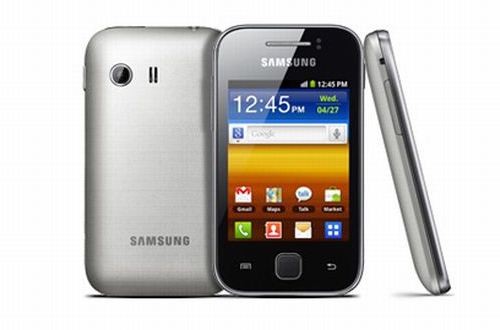
    samsung galaxy y s5360 root unroot How to Root & UnRoot Samsung Galaxy Y S5360 – Easy Tutorial
    Samsung Galaxy Y has huge base of users worldwide, due to it is most cheapest option when one consider to buy Android Phone. The much advanced users, always want to get Root access, to enable installation of all the software or customization. For all the freedom, and to unlock the full power, you need to get Super User access, which is possible when you root the device. But once you root the device, you will no longer able to claim warranty. But you won’t need to worry, we are here summing up both the tutorial of rooting and unrooting of Samsung Galaxy Y.
    Disclaimer/ Warning: Kindly note, Rooting is a risky process. We ‘Techscot.blogspot.in and developer will not be responsible, if your device bricked, damaged, or becomes non-functional. Though, we are writing this tutorial, after testing everything on a Samsung Galaxy Y Device, and it worked for us.
    Pre Requisite
    • Ensure that your device is charged, at least 80%, before going through the process.
    • Check with the Data Cable and latest drivers for connectivity of Phone and PC
    • Backup your SMS, Email, Call Logs, Settings and all the data, for safeguard against bad situation. If anything happens, wrong after applying the rooting process, you can simply restore everything from backup.

    How to root Samsung Galaxy Y S5360 Android phone

    Step 1: You need to download the Rooting package file from here and then save it in your PC.
    Step 2: Enable Debugging USB Mode. To get this done, simply navigate to Settings option, and then select Applications, where you will see Development option, tap with the same and then check USB debugging.
    Step 3: Connect your Samsung Galaxy Y to computer, and copy the File which you have downloaded in Step into root of microSD card of the device.
    Step 4: Now, select ‘Install ZIP from SD card, and navigate to the Rooting package zip file, which has been downloaded in Step 1.
    Step 5: Now, turn off the device. And then boot to the recovery mode. To enter into the recovery mode, just use home, Power and volume up buttons together.
    Step 6: Now navigate in recovery mode, using volume up and down buttons, find the ‘Apply Update from SD card’ then Browse ‘Update.zip’.
    Step 7: Now Go Back to home by pressing ‘++++Go Back++++’
    Step 8: Reboot your phone. After rebooting the device, you will see an application ‘Super User’, which would ensure that your device is successfully rooted.
    As you have just rooted your device, apart from the benefits, there is a minus point. I have already mentioned, you are not eligible to get company’s warranty after rooting. If you need to claim warranty, we have solution to unroot the device, which will make it same like it was before your applied rooting process. Head over below, where we have summed up the instructions to unroot the device.

    Steps to UnRoot Samsung Galaxy Y S5360

    Step 1: Ensure that there is no update exist of Super User App, you need to remove the same if they are located.
    Step 2: Connect the device to PC, if it is not already connected, via Data Cable.
    Step 3: Download Unroot package for Samsung Galaxy Y in your personal computer, and copy the zip file to the root or micro SD card.
    Step 4: Switch off the phone, and then turn on into recovery mode.
    Step 5: Select ‘Install ZIP from SD card, and select the unroot package zip file, which has been downloaded in Step 1.
    Step 6: It will take hardly 5-6 minutes maximum to complete the procedure. After that you need to reboot your phone.
    Congratulations! You have completed unrooting procedure of Samsung Galaxy Y, and you can now reclaim warranty.
    Let’s know if any problem persists, while going through the process of Rooting and Unrooting of Samsung Galaxy Y S5360 Android Smartphone.

    Sony’s Music Unlimited service lands on Vita


    Music-Unlimited
    The PlayStation Vita gains access to 15 million songs from Sony’s vast archives. Android devices get some love, too.
    Color me unsurprised that Sony’s PlayStation Vita just got its own app for the company’s cloud-based Music Unlimited subscription service, since a similar offering for the PSP already exists.
    Nonetheless, the first version of the app for Vita features excellent aesthetics with the complement of intuitive and thorough controls (see if you agree with me after watching the demo video below). Album art and channel listings clearly pop on the large OLED screen. I found it easy to scroll around, explore music, and save tracks “from the cloud” to a storage card.
    Overall, the experience seems very mature for a service often left out of the music service conversation.
    Speaking of saving tunes, the Vita Music Unlimited app supports offline playback through playlist/channel caching. Users of the Android version of the music service can now listen to music offline through Music Unlimited as well.

    Samsung Star 3 Duos S5222


    Samsung Star 3 Duos S5222 dual sim mobile is announced in 2012, January with some features of 3.15 MP camera,Bluetooth.Samsung Star 3 Duos S5222.

    Features
    - Dual SIM (dual stand-by).
    - SNS integration.
    - MP3/WAV/WMA/AAC+ player.
    - H.263/H.264/MP4 player.
    - Organizer.
    - Document viewer.
    - Voice memo.
    - Predictive text input.
    - Accelerometer.
    - 3.5 mm jack.
    Specification

    General
    2G NetworkGSM 850 / 900 / 1800 / 1900 – SIM 1, GSM 850 / 900 / 1800 / 1900 – SIM 2
    Announced2012, January.Coming Soon
    Size
    Dimensions102 x 58 x 11.5 mm
    Weight95 g
    Display
    TypeTFT touchscreen, 256K colors
    Size240 x 320 pixels, 3.0 inches
    Sound
    Alert typesVibration; MP3, WAV Ring tones 
    Speakerphone Yes, with stereo speakers
    Memory
    Card slotSD/microSD, up to 32GB
    Internal20 MB
    Data
    GPRSYes
    EDGEYes
    WLANWi-Fi 802.11 b/g/n
    BluetoothYes, v3.0 with A2DP
    USBYes, microUSB v2.0
    Camera
    Primary3.15 MP, 2048×1536 pixels
    VideoYes, QCIF@15fps
    Secondary No 
    Features
    OS
    CPU
    MessagingSMS(threaded view), MMS, Email, Push Email, IM
    BrowserWAP 2.0/xHTML, HTML
    RadioStereo FM radio with RDS
    Game Yes + Downloadable
    ColorsBlack, White
    GPSNo
    JavaYes, MIDP 2.0
    Battery
    Standard battery, Li-Ion 1000 mAh
    Stand by
    Talk time
